Operator

Operator is PartnerHero’s (now Crescendo) internal platform that unified fragmented support tools into a more scalable product suite. It gave agents, managers, and admins more consistent workflows and a stronger shared foundation.
I led UX and UI design for Assist, Quality, and the Operator admin panel, shaping key workflows, shared patterns, and product decisions with PMs, developers, and stakeholders. The work supported internal adoption and pushed the platform in a more mature product direction.
Project Type
Internal SaaS Platform
Role
UX/UI Designer
Timeline
2023–2024
Tools
Figma, Material UI, Jira
Scope
Research, Wireframing, Prototyping, Visual Design
Company
PartnerHero (now Crescendo)
The Operator Suite
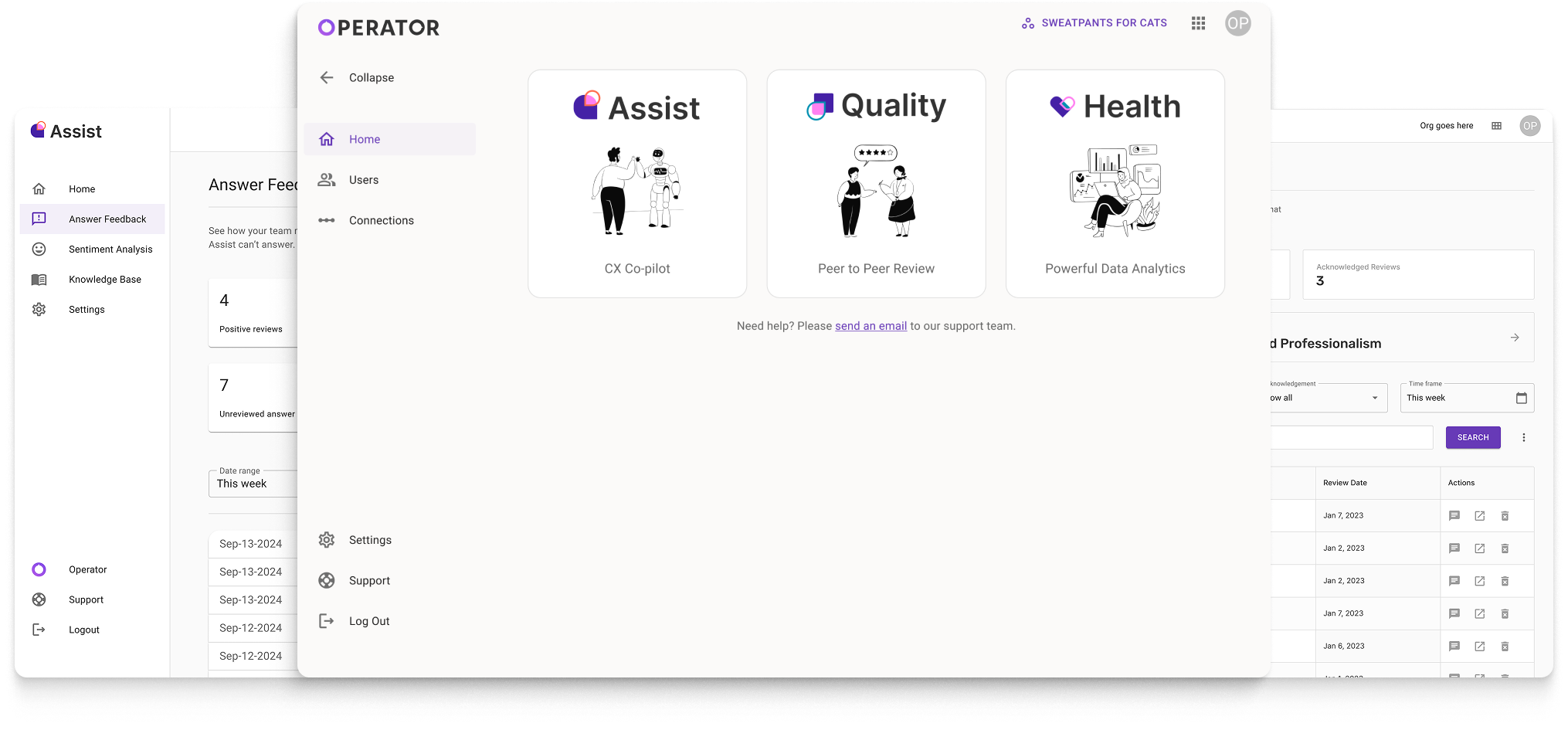
Operator is made up of three applications designed to support agents, managers, and admins with consistent workflows and shared data.

Formerly PartnerGenie, an AI copilot that helps agents draft and refine customer emails through a manager web app and an agent-facing Chrome extension.

Formerly Aprikot, a peer review tool that helps teams score tickets and improve performance through a manager web app and Chrome extension.

An analytics dashboard that aggregates operational metrics for managers and clients in a single web app.
Problem & Context
Teams relied on multiple disconnected tools to complete everyday support work, forcing agents and managers to navigate fragmented workflows and piece together information across systems.
Agents often had to switch tools to draft responses, review quality, and manage tasks, while managers struggled to review performance and extract clear insights without extra manual work. That fragmentation increased cognitive load and slowed operations across teams.
The opportunity was not to replace the existing tools, but to unify them into a more coherent platform with clearer workflows, shared patterns, lighter setup, and better KPI visibility.
Research & Insights
Research focused on where fragmentation, low trust in automation, and unclear performance systems were slowing teams down.
Current State Analysis
The experience was functional but fragmented. Core workflows were spread across separate tools and surfaces, forcing users to relearn patterns depending on the task.
For agents, that meant more context switching. For managers, it meant slower reviews and less clarity around performance. The issue was not missing features so much as a system that had grown without a cohesive product language.


Interviews
I interviewed agents and managers who used Assist and Quality daily to understand workflow friction, trust gaps, and the parts of the tools that slowed review or decision-making.
Sessions combined:
- One-on-one video call interviews
- Open-ended questions
- Live walkthroughs of real workflows

Insights
The research pointed to a broader coherence problem, not just isolated usability issues. Those findings shaped where we simplified workflows and where we gave users more control.
Agent experience
- The Chrome extension felt unclear and hard to scan
- AI-generated responses often felt too generic
- Trust in AI suggestions varied based on agent experience level
- Agents wanted faster editing before sending
Quality & ops
- Scoring flows in the extension were hard to navigate
- Rubric creation was difficult for managers to understand
- Reviewing and comparing data felt slow
- Managers needed clearer scoring systems and more actionable feedback
Key Takeaways
Three themes emerged repeatedly and became the clearest design priorities across the suite.
Fragmented workflows created cognitive overload
Users spent too much energy switching contexts and piecing together tasks across tools.
Automation needed more user control
AI worked best when it accelerated tasks without removing judgment, making editability and transparency essential.
Performance systems lacked clarity
Managers needed clearer scoring and more actionable insight to make the tools useful at scale.
Ideation & Design Process
The design work translated research into a simpler product direction: reduce workflow friction, improve control around automation, and standardize patterns across the suite.
I designed key flows across Assist, Quality, and the Operator admin panel around three principles: simplify multi-step workflows, reduce context switching, and make AI-assisted work easier to review and edit.
Because the suite served different users but needed to feel like one product, I focused on shared interaction patterns, clearer hierarchy, and reusable structures that could flex across applications.
Material UI gave us a reliable system for accessibility, components, and consistency, which helped the team move quickly without reinventing every pattern.


UI Previews
These screens show how the suite came together across admin, AI-assisted response editing, analytics, and quality workflows through a more consistent and scalable interface system.

Impact & Results
Operator made internal support workflows more consistent, easier to navigate, and easier to scale. It also created a stronger foundation for KPI tracking and reporting across teams.
Adopted by 500+ agents across teams
Unified design language across 3 applications and the admin panel
Positive early feedback around clarity and visual consistency
A future client-facing dashboard was also explored. It was never fully realized before the acquisition, but it influenced how the system was structured beyond internal workflows.
Reflection
Operator strengthened my ability to design across multiple interconnected products while keeping teams aligned around a practical, scalable direction.
Working across Assist, Quality, and the admin panel required balancing consistency with the reality that each product served different users and levels of maturity. It pushed me to think beyond individual screens and focus on shared systems and patterns that could evolve over time.
It also sharpened my ability to adapt when priorities shifted. Requirements changed often, and keeping the work effective meant aligning stakeholders, making tradeoffs visible, and protecting what mattered most in the user experience.